Asana help copy page link
Where can I keep track of my request?
Customized Asana views
Quickly see all requests your team has submitted to Digital Marketing with our customized Asana view below and get a clear overview of where your specific request stands in our workflow.
| Demand Gen | Channel/Partner | Product | Global Events & PR | Digital Marketing | Other |
| WWAN Projects | View projects | View projects | View projects | View projects | View projects |
See other initiatives in the Digital Marketing queue:
| View by Project | View by Content Type | View Blogs |
These customized Asana views effortlessly give you real-time insights
Quickly understand:
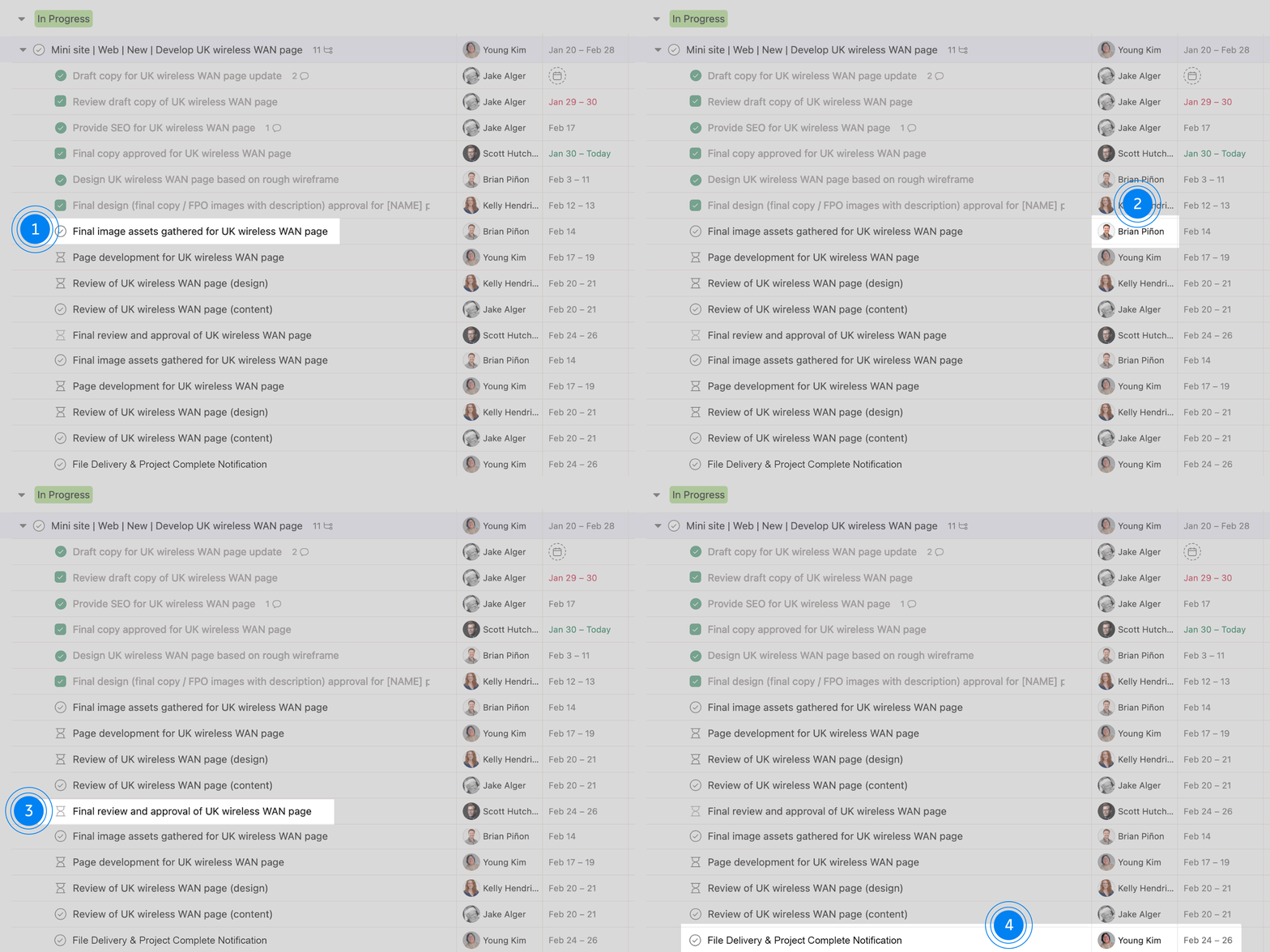
- 1 The current stage your project is in
- 2 The assigned team members handling different aspects of your request
- 3 When you can expect to be asked for a review
- 4 If we’re on track or at risk to meet the deadline
Asana key:
Scoping We’re gathering information to get started.
In Progress We’re activity working on your request.
w/ Stakeholder We need feedback or approval from you.
On Hold/Roadblocked We need more information before we can begin/continue work.
Understanding how to read Asana tasks
Heres’s an example project to give you some insight on how Asana is set up.
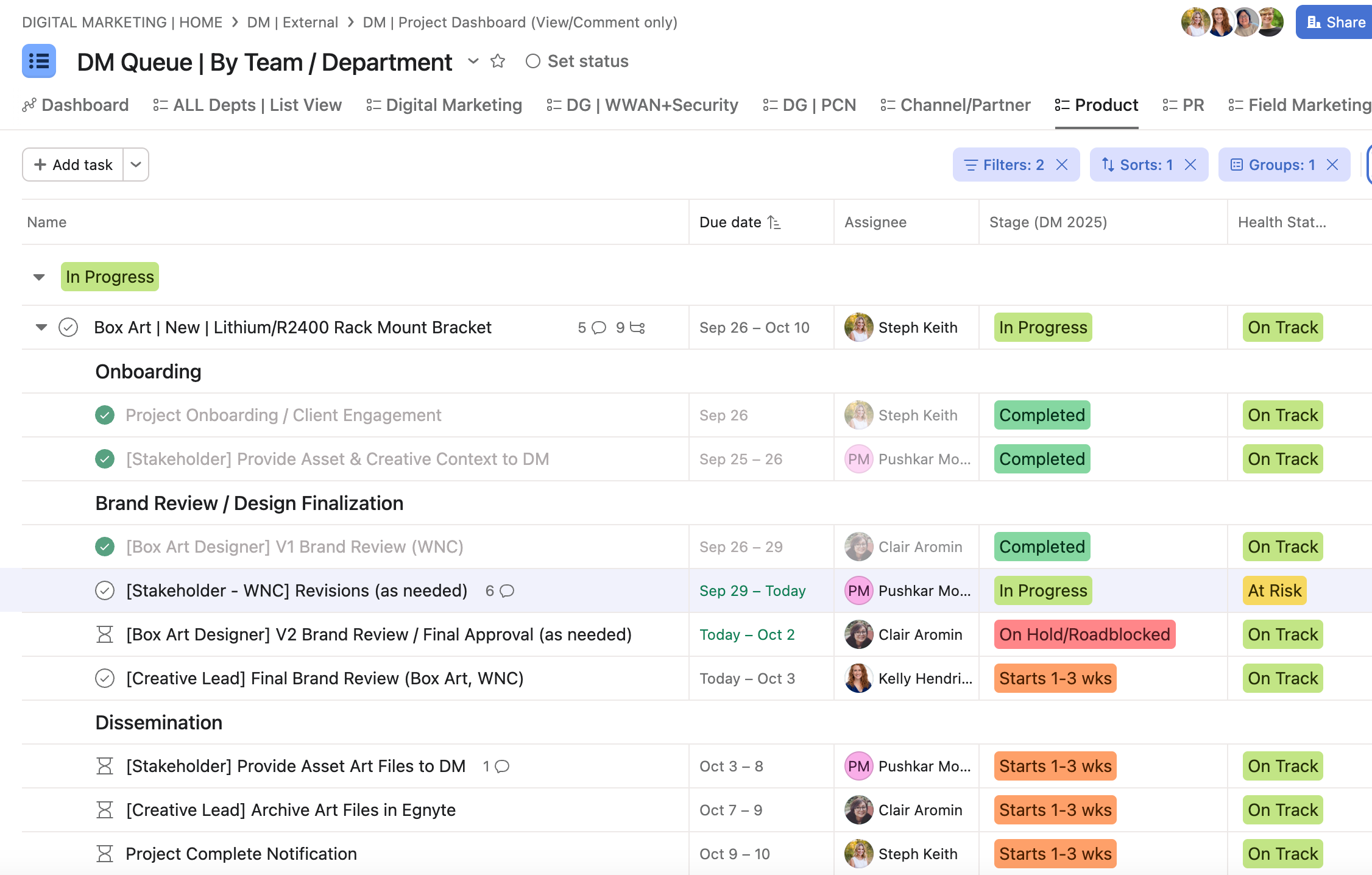
Now, let’s break it down:
In this example for Lithium/R2400 Rack Mount Bracket Box Art:
- The Project Manager is Steph Keith
- The parent task status is In Progress
- The work is On Track

Steph has onboarded the task into our queue, engaged with the Stakeholder to answer any lingering questions and provided context to Creative/DM, and Clair has done the first review.
Those subtasks have been marked Completed.

The current status of the task is indicated by the subtasks that are still open. In this case, the Stakeholder (which is Pushkar) is responsible for providing box art revisions from WNC.
- Status = In Progress
- Due date = Sept 29 – Today
Clair is responsible for the next step in the process, which is to provide a brand review, but her subtask is dependent on completion of the previous subtask (indicated by the hourglass symbol) and therefore is marked On Hold/Roadblocked.

For the final step in this request, Steph will notify all involved parties when the project is complete Oct 9-10.
How do I report or escalate issues?
Have a concern? We want to know! Please address it with us immediately by communicating your concern directly within the relevant Asana task so we can see the entire context of the project. Tag both your team lead and the project manager to ensure visibility and prompt attention.
Additionally, we hold weekly Asana meetings that you can drop in and ask questions!
Teams link
Our team is committed to working together to find an amicable solution as quickly as possible. If necessary, the project manager will involve leadership to assist in resolving the matter.
Tips & tricks
Here are some common questions we receive that may help you work more efficiently in Asana!
I’m not in Asana frequently – how can I keep up with review cycle for my subtasks?
Consider downloading the Asana app to your phone. Setting up push reminders for when you are tagged can help you stay up-to-date with notifications without having to manually check!
October 1st, 2025